







 The Basics
Web-based threats, email spoofs, keyloggers and spyware..... We all face threats from bogus sites, apps, spoofs, redirected comms and data breaches. Most such threats on the Macintosh require your active participation. Don't be a victim.
Apple has all but eliminated the threat of viruses, but that's not to say Mac users can be complacent about security. Keep your current OS updated, know who you're dealing with, and never download anything from unidentified or unknown sources. The most significant threat to security is physical access to your computer or device. Wireless and remote threats are managed by maintaining security protocols, common sense and passwords. This page is about Mac security and what you should know to protect yourself - and what to avoid. Malicious software (Malware) is not easy to remove
Avoid all anti-virus apps, cleanup/maintenance apps, PDF readers, video viewers, and "free" utilities. Once installed, they needlessly consume storage space, waste CPU cycles and can cause havoc, even those found on Apple's AppStore. Macs have no need of an antivirus since nothing can be installed without user's password. In other words, you're free to install anything you like (as Admin), but without Admin's intent - and password - nothing can come aboard.
As for maintenance and "cleanup" apps: Some, like MacKeeper, cause problems in hope you'll buy it to "fix" the problems they cause. Don't waste your time; the only maintenance app you might need comes with the Operating System: Disk Utility, in your Utilities folder.
Security on steroids
Since the end of OSX (Catalina), Apple has gone on a security binge with new "features" that can easily ruin your day. The OS is now on its own locked partition, meaning no access, no OS backup, and (possibly) no downgrade if a new OS install isn't to your liking - a primary reasons for having backup on an external drive.
Security options can block access to troubleshooting and data recovery by preventing any access from another Mac or external device. Add Apple's new Activation Lock, and your Mac might be bricked. These "features" are all on by default. If you know what to look for and where to find 'em, they should be disabled to prevent potential disaster; most of us have no need of such things. More info is posted in "Over-The-Top Apple Security" section below.
|
 PDF readers, video viewers, utility apps Was a time when Portable Document Format (PDF) was a new file type from Adobe and required Adobe Reader, but that was long ago. PDFs are built-in to the MacOS and Apple provides the Preview.app for dealing with PDF files.
Creating a PDF is another matter and may require a suitable program if making complex PDFs; otherwise, Pages and other word processors can export documents in PDF format. There are a lot of unnecessary PDF utility apps out there, a few are legit while others are merely scams - it's important to know the difference before downloading and installing such apps. Same with "video viewers" and a host of other bogus programs out there. Spend a minute researching any potential downloads.
A word about Malwarebytes...
This program was originally designed to stop pop-ups on the internet. Designed by a gentleman named Reed and available on Apple's discussion site, it was a free giveaway for many years and became quite common. It was so successful, the good Mr. Reed sold the program and it became a commercial app. Unfortunately, it now includes something called 'Threatdown" and has been redesigned in such a way that makes it useless and difficult to remove. Malwarebytes is now best avoided.
Cleanup, speedup, fixup apps
Programs that claim to clear cache files, remove unnecessary software and improve performance are seldom worth the trouble. They will try to impress you with scans and charts and graphs, while needlessly wasting your time. Deleting cache files only means the System will have to recreate them, and the OS is fully capable of managing cache files. In fact, many such "maintenance" apps merely put their own interface onto processes built into the Operating System. Most have little or nothing useful to offer.
"Do I need an anti-virus program?"
No. Nothing gets installed on a Mac without entering a password and clicking an install button (after a warning or two). Viruses cannot come onboard without your knowledge, permission and password - which is why there are so many fake apps floating around on the internet hoping to be downloaded. Companies that make anti-virus software would be foolish to ignore the Macintosh market, so they will sell you their product despite knowing it's useless. Some such apps can become a bigger problem than any virus they pretend to prevent.
Before downloading and installing software, take a minute to search the 'net for it by name and see what is being said about it. If there are lots of people trying to remove it, you might want to reconsider.
|
 Keep a hand-written list The day is certain to come when - for whatever reason - you can't get into your computer or gizmo. If you've stored a backup list of passwords on the device, they will disappear along with everything else unless/until data is restored from your backup. Best solution is writing down the myriad of passwords you use in a small notebook and keeping it somewhere safe.
Password requirements vary greatly between devices and web sites; device login passwords (or passcodes) may be as short as four characters, while many email and web sites may require 8 characters or more that must include upper/lower case, numbers and special characters. Since the login password is required frequently on a computer to install/delete files or modify settings, do yourself a favor by keeping it short if you have the option to do so.
Two-factor authentication
In many cases, this requirement is merely a way to get your phone number (verified by sharing a 'secret code' between devices). Each time you add a phone number, you can bet it will be sold to telemarketers, despite carefully worded privacy policies. An email address and password should be sufficient to keep others out of your accounts, especially when you consider the real threat to your security is from servers getting hacked rather than an individual account. Identity theft happens when mortgage companies, banks, service providers, online stores, the DMV and big companies get looted, as frequently occurs these days.
Enhanced security?
It's become such a problem that an entire industry has sprung up promising to "lock" your identity, secure your home's title, or protect you from various threats for a monthly fee. It's just another scam feeding on unwarranted fear. Don't waste time and money on things that merely require a little common sense.
Best solution is to remain vigilant, pay attention to credit card and bank activity, carefully examine sources and investigate links before clicking anything, and avoid falling for scams. Most of the "security" problems we deal with here are the result of giving away information over the phone, or sending info thru some bogus link or suspect email.
|
 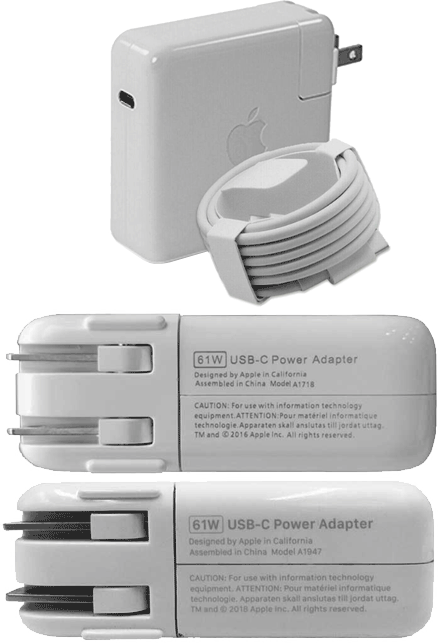 61-watt AC-Adapters (aka chargers) for 13" and smaller MacBooks
Fake chargers on Amazon and eBay
Of the AC-Adapters shown above, only one is a genuine Apple product. They all look identical, with embossed Apple logos, all the official safety certifications, model numbers and copyright info. Some include a coiled USB cable in Apple-like packaging.
There are three ways to tell them apart; one is weight, another is measured output, and last is the only visible difference between them, their printed labels. Bottom unit is the real thing. Compared to the fake above it, font is slightly different and printing isn't quite right. This is the only visible tell when shopping online.
Counterfeit chargers are a waste of money. Less than proper output will cause heat and may damage computer's charge port, battery and/or charging circuit. Those safety certifications are meaningless, and that cable probably can't handle rated output (20v/3A). Saving a few bucks on a bogus charger can be costly.
Junk flash drives 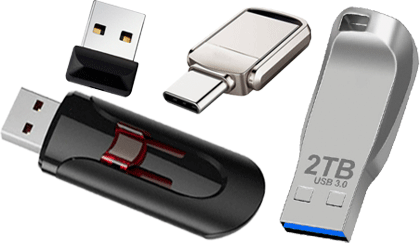 Also flooding the market are bogus USB flash drives. Found online and on store shelves (even store brands) these are especially insidious by design. Flash drives pictured above all advertise as USB-3 - they're not - and 2TB capacity - nope. They typically sell for far less than legitimate drives with a too-good-to-be-true price.
When plugged in, some are even programmed to lie about their specs to match advertised specs (if they work at all). Some may record files names only without recording the actual files, leaving you to wonder if there's something wrong with your computer. Stick with name brands like PNY, SanDisk, Samsung, etcetera, and avoid no-name and store brand drives.
Bogus iMac adhesive kits
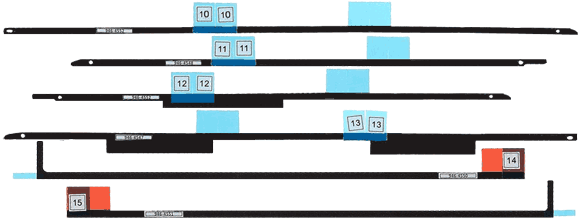 Proper Apple display adhesive kit
Above is an iMac adhesive kit used to secure iMac's display to machine's case. These strips go all the way across top and bottom edges of display and down both sides, just behind edge of the glass. Strips are composed of three layers: A thin layer of foam sandwiched between two layers of adhesive.
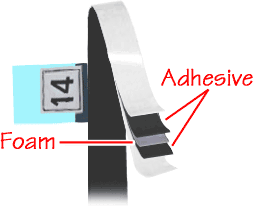 Removing an iMac's display is accomplished with a tool that resembles a tiny pizza cutter; its wheel is inserted into adhesive's foam layer, then tool is run around top and sides of the glass, cutting thru foam and separating adhesive. Strips at bottom of display (with red tags, above) will split apart at foam layer as display is pulled away from top of machine. Bottom strips also have vertical tabs on outer ends to assist removal. Removing an iMac's display is accomplished with a tool that resembles a tiny pizza cutter; its wheel is inserted into adhesive's foam layer, then tool is run around top and sides of the glass, cutting thru foam and separating adhesive. Strips at bottom of display (with red tags, above) will split apart at foam layer as display is pulled away from top of machine. Bottom strips also have vertical tabs on outer ends to assist removal. Proper and authentic Apple kits ship flat, in a sealed bag, ready to install.
 Apple adhesive kit for 21" iMac - shipped in a box - from a legitimate source
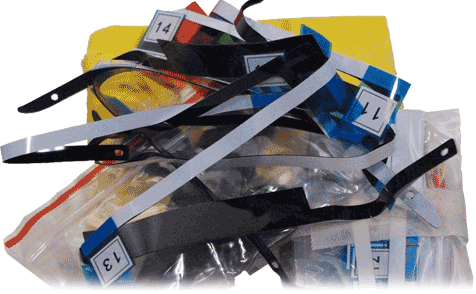
Cheap, bogus adhesive kits are everywhere now, even some legitimate vendors are selling 'em. Bogus kits are made to look like the real thing, but they lack the key feature that makes the process work: That critical foam layer. Removing a display secured with a bogus kit is a PITA and risks doing damage. Please do us all a favor and use real foam-layer kits if servicing an iMac.
If cheap is all that matters, below is the tangled mess of gummy double-stick tape you're likely to get, all wadded-up in a 4.5" envelope.
 |
 Keep files on your desktop to a minimum. Two good reasons for this are to conserve RAM, and because the desktop - like the trash - has no further address in your Mac's directory; Desktop and Trash are shared by all volumes, disks and networked machines.
The Desktop should be treated as a temporary landing spot for files until you decide whether to keep 'em or not. If a file has served its purpose or is no longer needed, trash it; otherwise move files into appropriate folders within your drive (Documents, Pictures, Music, etc.).
First off, it may help to populate the Finder's sidebar if you haven't already. Under Finder menu, open Finder's Preferences/Settings and click the Sidebar tab:
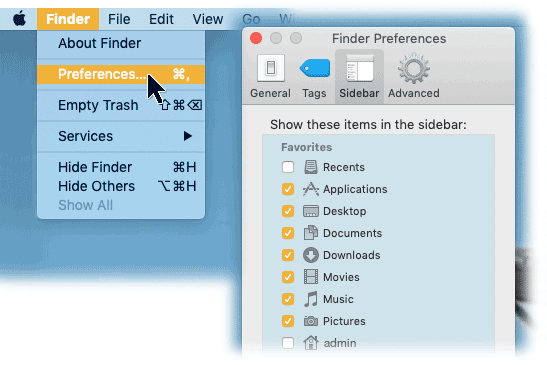 Putting a check mark next to the items shown above will put those items in all Finder window sidebars for quick and easy access.
From the Desktop window, drag/drop files to appropriate folder in sidebar according to file type - photos into Pictures folder, music into Music, etc. Sorting files in Finder window by Kind may make things easier:
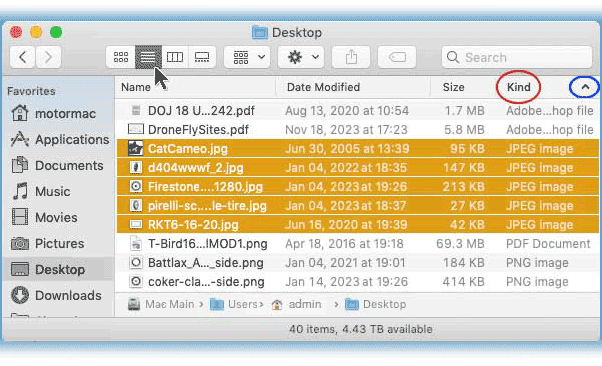 Screen shot above shows Desktop selected in sidebar. Contents are shown in list view (arrow), sorted by Kind (red circle) then ascending (blue circle). All JPEG files are selected, ready to drag into Pictures Folder where JPEGs belong.
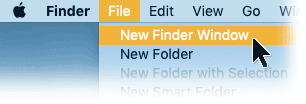 It may also be helpful to open a second Finder Window and relocate files by dragging them between the two windows.
Tip: While you're at it, open Finder's View menu and turn-on two helpful options: Show Status Bar, and Show Path Bar.
Safari, like all web browsers, has preference settings to delete cookies, extensions and other junk that accumulates over time (collectively known as cruft). Safari also has a shortcut in Safari Menu: "Clear History..."
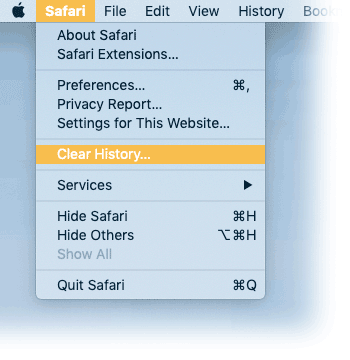 Select Clear History, then set to 'All History'. This will get rid of ALL cookies, history and cruft with next click. Other browsers have these functions under browser preferences for deleting cookies and history. Also check for bogus extensions, especially "search" add ons that often produce pop-up ads.
 iPhone, iPad, iOS cleanup
Getting rid of trackers, cookies and crap on iOS devices is a bit more complicated and much more opaque compared to computers. Cleanup requires a number of steps; start by opening the Settings icon in your iOS device:
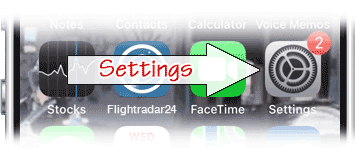 In Settings, scroll down and tap Safari:
 In Safari settings, scroll to very bottom and tap Advanced:
 At very top of Advanced, tap Website Data:
 Scroll to bottom again and tap Remove All Website Data and confirm:
 Back in Safari settings, scroll to Clear History and Data to delete that, too:
 Doing this periodically will clear trackers and cruft from your iPhone/iPad, reclaim space, and improve performance. Once you get used to this process, you can execute fairly quick. Think of it as taking out the trash.
There may be more hidden data on your device:
Go back to the Settings icon on your iGizmo:
From Settings, open General:  Under General, go to Storage:
 Scroll down the storage list and look for "On My iPhone" or "On My iPad" - if present on your device. This item only appears if it contains data, and it magically disappears if emptied:
 If "On My iPhone" is present, it may contain some surprises....
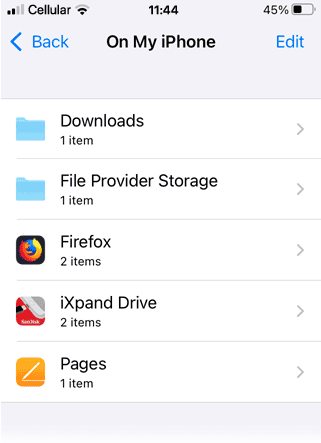 If you take screen shots, download documents, use social media or certain apps, you may find files copied here in addition to wherever you put them. Screen shots, for example, go into Pictures, but you may find copies here.
Opening the two folders shown above may reveal nothing more than a date. Same for named apps. Firefox appears to be empty despite listing "2 items." Likewise Pages. The 128GB iXpand Drive also hides whatever it may contain. BTW, iXpand's EULA includes surrendering ownership of anything stored on it, much like Apple's iCloud does.
While you may not be allowed to view the contents of "On My Phone," you are free to delete items stored here - without affecting original files.
Deleting everything in "On My iPhone" doesn't change files stored elsewhere - photos won't disappear, docs remain where you put them.... so, what is this? Odds are, these files have no benefit for you. The fact that "On My iPhone" completely disappears when empty lends a creepy quality to its presence; it also suggests some involuntary sharing going on.
|
 By definition, a computer virus must have three specific traits:
"I think I've been hacked!"
Malicious software - aka malware - comes in a wide variety, from phony updates to bogus apps of all kinds. Types of fraudulent apps include fake cloud backup, bogus online password management, maintenance utilities, readers, viewers, players and assorted other "helpful" apps. If you enlist the services of cloud backup, you'll be sending them all your data, legitimate services and bogus ones alike. Same goes for password management services that store your passwords. Do you know who they are or where they're located? No password or encryption, no VPN or security measure can protect you from voluntarily engaging thieves or downloading garbage. No, you haven't been hacked. Banks get hacked, Social network sites get hacked, Google, Yahoo (et al), credit sites and retailers get hacked. People generally don't get hacked, aside from an occasional celebrity or maybe an acrimonious divorce. "Hacked" is one of those terms that sounds good, but usually means scammed.
Know who you're dealing with.Free, demo, trial apps, bogus updates, PDF/Word readers, video viewers, and a slew of Mac fix-up apps - including paid versions - are as close to viruses as we get on the Macintosh platform. Don't go there.
 Best advice:
If you limit (judicious) downloads to Apple's App Store and only deal with KNOWN sources by making certain the address in web browser is legitimate, you'll have little to worry about. That's the short version - more info and details follow.
(Also see our Rants page for more on security concerns.) |
 As a friend says, "you have to be smarter than the tools you work with." Just because that email says it's from a friend - doesn't mean it is.
Of course, if you rely on mail thru Yahoo or Google or other online service, the security of your email (including your address book and whatever else is attached to your account) is out of your hands and up to the service provider. They get hacked on a regular basis, so don't be surprised if it happens to you and suddenly everybody you know is getting spam with your name on it. Such security breaches occur all too often, and that's the risk you take when using free online mail services. Your choices are to change your email address or just wait until it blows over (which it eventually will). |
 If it comes looking for you, you don't want it. Real-world internet security concerns (regarding Macs) revolve primarily around downloads that may be deceptive and/or damaging if installed. This cannot happen without your active participation and knowledge. If you see some unexpected message popup while surfing the 'net, and it wants you to download, scan, update or install something, don't do it. Cancel/close and ignore the message.
In the case of email attachments, a virus might well be attached to some email message you receive, but these are typically incapable of doing any harm to a Macintosh. However, while it cannot affect your Mac, if passed along to a Windows machine where its code _can_ execute, it might attack the Windows user. Delete it.
Best advice is to simply be aware, be suspicious of uninvited prompts, and don't click anything you're not absolutely certain of. Clear your history and delete cookies periodically (although you may have to hunt for some of 'em - see below), open a new browser window if you like (File menu -> New Window) and use your bookmarks or type-in the address you want to go to. Cancel unexpected options and avoid anything even faintly suspicious.
  The term "Malware" (short for malicious software) refers to a variety of bad-nasty things floating around in cyberspace, including viruses, spyware, Trojan horses, and a host of lesser types (in terms of potential damage). Rule of thumb: If you need some app or software, player, update or utility, go to the source and get it. DO NOT download anything that comes looking for you!
Spyware is a whole different animal. This category includes commercial programs designed to track computer use and record keystrokes, but these are not necessarily viruses. Popular with parents, security departments and company bosses, spyware provides indisputable proof of computer use and activity. That's the legitimate use of spyware: Parental control, tracking company time and tracing activity. But - spyware can also be used to steal passwords, banking and credit card info or other personal data for purposes of theft. Properly installed spyware requires physical access to machine for an extended period of time, a few hours or more. Once in place, professional spyware is - by design - difficult to detect. The cheap and cheesy types are rather obvious. A Trojan Horse - like the Greek myth - requires your active participation to download and install before it can do its thing. Therefore, it must trick you into bringing it onboard by masquerading as something attractive or pretending to be something it isn't. Here's an example, one of hundreds popping-up on the internet these days:
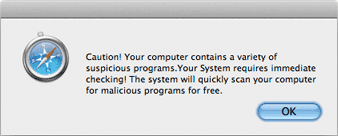 Text is laughable - doubt if many who read this would fall for it
If you click OK, the next window will be a "free download" of the Trojan disguised as an anti-virus app. If you are gullible enough to download, you will then have to enter your admin password to install it and you'll be warned that you're about to install an app from the internet. Just close the window, quit browser if you have to, or trash the file before installation and you'll be fine.Some of these Trojans will put up a window listing a few files it claims are infected and should be "scanned" immediately. We've seen many examples of this type over the years, and most look very much like a genuine Mac application. (We tracked one to Belize, by way of Germany, with a contact number in Russia.) Fortunately, they're easily removed and relatively harmless but always best avoided. While the Microsoft Windows world has long been awash in viruses that cannot infect the Mac, that doesn't mean Macs are 100% safe. The Macintosh remains largely immune due to proactive prevention by Apple at the core of your MacOS, but there are lots of other threats out there besides viruses. Nothing gets installed on a Mac unless a password is entered and installation is approved. The only protection you really need is common sense. |
 Privacy versus practice
The World Wide Web should be free, unregulated, uncensored and untaxed - but it also needs to be approached with care. Dealing with the internet means you can assume you're being tracked and you're quite likely to encounter something nasty along the way.
If you have a network and internet connection, you must protect it. Use a router with a firewall and secure password, especially since most routers include wireless functions. Normally it's just a matter of selecting the best available protocol and setting a password - never use preconfigured passwords that ship with devices, create your own - and remember to write it down. Connecting to networks out in the wild is another matter entirely. Consider these to be wide-open and unsecured, and never transmit anything sensitive over a foreign wifi network. There have been reports of thieves setting up adjacent networks with names matching legitimate ones; that "Starbucks" network might be Starbucks or it might be some bozo out in the parking lot. This type of spoof can be difficult to detect or verify. You can also assume a general lack of privacy, as virtually every app you use is phoning home with some data yo target ads or check for updates, whether on a computer, tablet or phone. GPS-equipped devices may attempt to map wireless access locations by sending coordinates and network info. Computer and software makers collect and send data, including OS, app versions, and machine specs. Any audio device may be transmitting all it hears (with or without your consent); phone apps are notorious for trampling on privacy. There are legitimate types of data collection used to enhance product performance and provide assistance, but the line between that and eavesdropping is disappearing. Pay attention to network activity
The key (on a Mac) is that nasty stuff, like all software, requires login password and permission to be installed. Once onboard tho, malware can collect info, spy on activity, eavesdrop on communications and even reroute network traffic. (Yes, that includes Macs.) It's not unusual to find Koreans scanning your ports, cookies from countless unwanted sources, or servers horning in on web locations; these are easily stopped in their tracks. It's another matter to find something operating in a System's background secretly collecting and sending data while consuming upload bandwidth. It's something to watch for by checking network activity (Applications > Utilities > Activity Monitor).
We recently removed no less than five different variants of a malware app designed to hijack network comms on a single machine; one of those apps dated back five years. But, credit where credit is due: That particular machine had been used to explore, shall we say, "seedy" segments of cyberspace and malware was voluntarily downloaded by its owner.
Turn on your OSX firewall
(System Prefs > Security pane > Firewall tab - should be on by default), and do not allow file sharing of any kind over the internet. Sharing thru your own local area network (LAN) is fine; office networks are usually managed by in-house IT staff. Torrent, movie and music sharing sites are well-known for passing malware, so if you want some app or music - hey - buy it! No sympathy here for those who install BitTorrent, uTorrent, Limewire, Vuze and other such software. Legitimate sources consider it theft to use such things, and so do we.
If you need a 'viewer' or update, go to the source and get it
Adobe.com's Flash Player (deprecated with HTML-5) should be uninstalled.
VideoLAN has VLC for translating WMV and MS file types, and QuickTime will open most A/V files. Odds are you already have software that will do whatever you need. Avoid anything that shows up uninvited while surfing the web, including video players, warnings, "updates," or apps that claim to speed-up, clean or fix your Mac. Some of the latter are malicious.
There's only one way to absolutely guarantee total network security on any computer, and that's by disconnecting from the internet altogether (airgap). Short of literally pulling the plug on communications, remain vigilant to intercept and identify potential leaks, control access, use passwords and pay attention. Again, the #1 (and arguably only) security tool most Mac users really need is common sense.
|
 The biggest threat to any computer is having it fall into the wrong hands, so restricting physical access is most important. And the threat isn't just from theft or those with mischief in mind, it can be data loss or damage done by accident, too. Hand-in-hand with protecting physical access is having a proper Admin account with a secure login password. This is especially important for notebook computers and portable devices that may go missing, and machines shared by two or more people. Create a unique password, make it a good one, and write it down somewhere safe to make sure you don't forget it. (You can give yourself a hint, too, when you set it up.) No one else should have your password; if you share a machine, setup an account and password for each user. You can require a password to wake from screen saver/sleep to protect your computer if you step away for a moment. Turn on your Firewall if it's not already on by default. And be sure to disable automatic login at startup in the Security pane of System Preferences under its General tab: 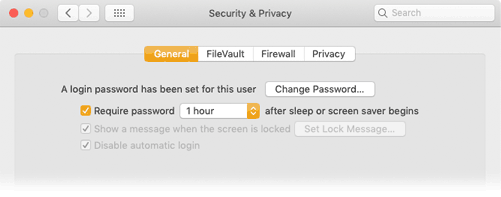
Options here include password to wake from sleep, login password protection,
Firewall, and more. (If FileVault is off, suggest leaving it off)
Then there's the FileVault tab (shown above): Here you can set a master password and encrypt everything on your hard drive - NOT recommended. Encryption may slow ops a tiny bit, but if you lose your master password all your data will be lost. FileVault is there with industrial-strength encryption if you really want it, but you'd need a _serious_ reason to make it worthwhile. FileVault is overkill for most people; you are well protected by passwords without the hassle of encryption.
|
 Spyware is a general category of programs designed to track computer usage. These are not viruses per se, so anti-virus programs may not detect them as such. And, because programs used as "parental controls" or for additional security may contain keyloggers to record who did what and when, keyloggers aren't exactly malware either. Even some simple keyboard-shortcut utilities have keyloggers. Other types of spyware can record chat room and internet activity, emails, logins and software use. Some spyware apps are capable of using a computer's camera to take snapshots, record video and/or send location info as well. This info may then be stored for later retrieval or sent via WiFi. Such apps may be also used to recover lost or stolen notebooks. If you are concerned that someone is spying on you and your Mac for some nefarious purpose, consider what it takes to put spyware on a Mac: First requirement is physical access (discussed above). Login password for your admin account is also necessary, and to properly install spyware so as to make it as undetectable as possible can take a good deal of time, 3-4 hours or more. So, if your machine hasn't left your possession, it isn't shared or available to others for an extended length of time, and it has a decent (secure) login password, you probably don't have anything to worry about. The same applies to iPhones, iPads, and other such devices, with one important caveat that might make a difference. When you sync these devices to iTunes on a computer, iTunes automatically makes a full backup for you in case it's needed to restore the device, and that backup remains (buried) on the computer you synced your gizmo to - which, by rights (and by design) _should_ be your own computer. But, if you synced to someone else's Mac or PC, they have all that data, and that might be a problem. Unfortunately, hunting down spyware requires forensic processes and techniques that are beyond the scope of this discussion, especially if the prospect of legal action is a possibility. Installing anti-virus apps or "cleaning" utilities is just asking for trouble and of no help. Best hope for putting your mind at ease is to carefully consider time and access requirements for spyware installation, continued access necessary to retrieve keylogger/spyware records, and the likelihood of anyone going thru all that trouble to spy on you. If you still think you have a problem, give us a call, make an appointment, and we'll see what we can do. We won't help you spy on someone else (if that's what you have in mind) but we can certainly find out if you are - or have been - a target.
CIA and NSA programs
 Yes, thanks to Wikileaks we now know the CIA has an Embedded Development Branch (EDB), creators of a number of programs designed to infect the Macintosh (and PCs). These programs, code named "Dark Matter", "SeaPea" and "NightSkies" (collectively known as "Triton") have been active since 2008 and were being updated to infect new OS versions as released by Apple. We first ran into Dark Matter in 2011 on a brand-new Samsung SSD purchased from Amazon. We had no idea what we'd found, only that the drive had a small 64K EFI partition in an unknown format - embedded in the drive's firmware - that could not be opened, examined or erased.
As with Dark Matter, these things aren't hard to find and identify if one knows what to look for and where to look. "Dark Mallet", "DerStake", the "Sonic Screwdriver" project... the CIA's user manuals for their spyware reads like any other user manual, all very matter-of-fact and concise. Only thing missing is the end-user license agreement (EULA). Apple claims to have secured its OS against this sort of tampering, but in the spy-versus-spy world of tech surveillance you can be sure agencies have moved on to new and better things. Recall that the NSA is recording _all_ comms and data in real time, turning devices into spies. Rule of thumb: If they can do it, they will. |
 Short version = there is no privacy. But, with more trouble than should be necessary, you _can_ take out the trash and keep tracking to a minimum while sometimes solving online problems. Here's how:
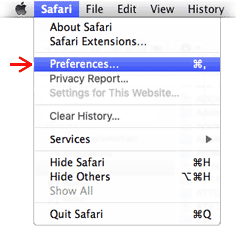 All applications (programs) have their own preference settings under menu with app's name, in this case Apple's browser, Safari. Open Preferences and choose Privacy tab ( below). You can do that right now if you want, just move your prefs window aside so you can still see this one.
BTW: Different web browsers have different layouts, and the options we're looking for may be located someplace other than illustrated here. You may have to do some extra drilling to clear history, check homepage and toss cookies.
Opening Safari's Preferences presents window below, depending on version:
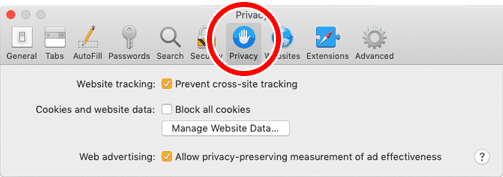 Older Safari version Prefs. Clicking "Manage Website Data..." shows all cookies
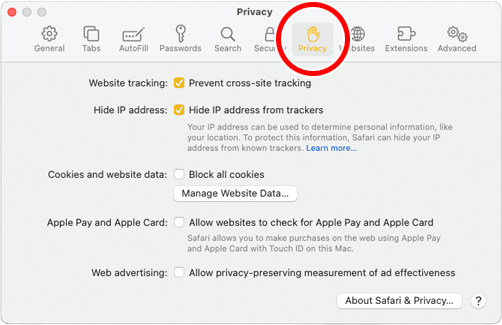 New Safari Prefs gone bland. Other browsers have similar options under prefs or tools menu
The Privacy tab allows you to remove cookies from sites and servers tracking you as well as those with legit purposes, such as login cookies used by discussion groups, vendors and auction sites. You'll just have to login again if you toss the good ones with bad, but Safari can remember most logins if you want it to. You can peruse cookies by clicking "Details..." button if you wish, then delete 'em individually, too. You might think we're done, but - no.
Shortcut: Older versions of Safari had a reset for removing much of the "cruft" that accumulates with web browsing, found under the Safari menu as either "Reset Safari" (up to OS 10.9), "Clear History and Website Data" (10.10), or simply "Clear History" (from OS 10.11 on): Choosing "Clear History" deletes history along with all accumulated internet cookies and cruft for time frame selected (hour, days, all time): 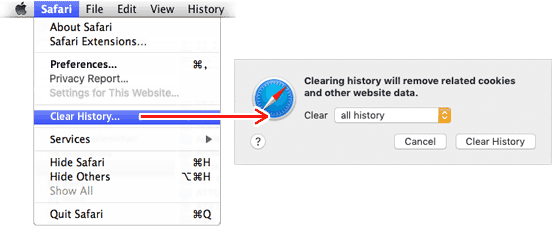 So, we're done now, right? Not quite...
There are dozens of browsers out there - Safari, Firefox, MS Exploder, Chrome (best avoided), and Opera to name a few - all have different storage, tracking and "privacy" schemes, different front ends, prefs and options with their own agendas. Most other apps collect/send data and check for updates, too. This is why you really can't expect true privacy, but you can certainly keep traffic to a minimum.
|
 Since putting the OS into a locked partition (starting with OS 10.15 Catalina), Apple has added security features that can - and will - prevent any access to data on your Mac by anyone - including you. All users running OS versions after OSX should be aware of these new security features, which are on and active by default. Startup Security
To check Startup Security settings, startup your Mac in Recovery Mode:
Intel Macs: From OFF, press and hold Command+R during startup
Apple M1 and later CPUs: From OFF, press and hold power button for 10 seconds, then choose Options and select Recovery. Once there, you'll see the menus illustrated below.
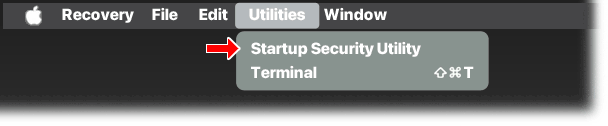 Utilities menu in Recovery Mode showing Startup Security
NOTE: Older OSX Systems may not have Startup Security; instead, there may be an option for setting a Firmware Lock - DON'T do it, just restart normally and you're done. If you don't have Startup Security, you have one less thing to worry about and much of what follows doesn't apply to you - yet.
From Recovery Mode, open Utilities menu. If you see Startup Security Utility (above), select it and click Security Policy button to see this dialog box:
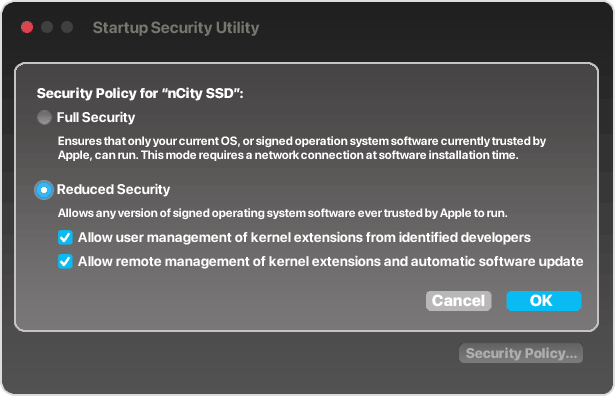 Recommended Startup Security settings for OS 13 Ventura and later
Full Security setting (on by default) guarantees that no one will be able to access your data from any system or drive aside from the system that's onboard. Of course, this assumes machine is fully functional; if the Mac is not fully functional, this setting locks out troubleshooting and data recovery, with or without the password. Having seen many machines with broken displays, spills, lost passwords and other issues, being locked out may add data loss to the trauma, which is unacceptable. The setting should be OFF unless needed.
Reduced Security settings (as shown) are recommended to allow networking with another Mac or drive, data recovery (if needed) and troubleshooting.
Once you decide whether to leave it on or turn it off (and are aware of its function), quit Recovery and restart your Mac normally to exit Recovery Mode.
FileVault
File Vault data encryption, also on by default, is a much older security feature that's been around since about 2003 and Mac OS Panther. Is it necessary? No. FileVault is in System Preferences in older machines, or System Settings in newer OS versions under Privacy &Security, as shown below.
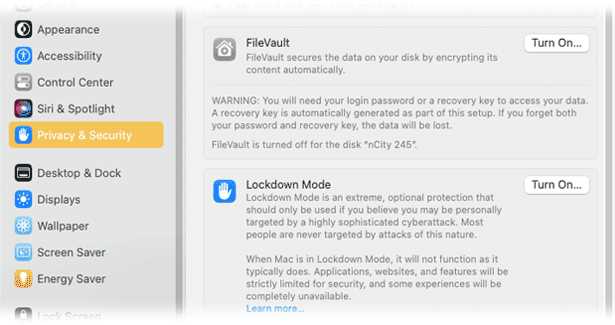
FileVault and Lockdown Mode from System Settings in OS 13 Ventura and later
FileVault is fairly stable, transparent and harmless - unless you lose or forget the Master Password. We've had clients who set a password and promptly forgot what it was. Result = SOL. Like most real security features, there is no workaround. If it's on, the "Turn On..." button illustrated here shows as "Turn Off." Turning off FileVault can take a long time, it still requires the password, but might be wise.
Lockdown Mode is yet another new security feature, and this one is so extreme it is OFF by default. Apple recommends this setting for those who may be under active attack in certain circumstances. More info from Apple here and here, but for the vast majority of us, this feature should be left off and ignored.
NOTE: Upgrading to Ventura or later OS may "lock out" your Time Machine backup drive, especially if it's a rotational drive from prior OS versions (this issue is still developing). Suggest getting a new SSD backup drive for OS Ventura and later. Existing backup drive is still available when connected to an older OS, and your data should be intact if needed.
|