






| What the heck happened? Some strange things have arrived on the bench over the years...
Broken hinges, dark displays, stuck discs, dead drives, damaged keyboards, haunted trackpads, pooched ports - machines that have been shot, punched, drowned, dented, dragged behind a truck and set on fire. Some of the more notable examples appear below. Only thing worse than no info is bad info. 
Bad info + assumption = trouble. Wondering why your Mac is misbehaving? Following online advice might solve it, if the cause is known.... or it might lead to bigger problems, like the guy who deleted all his files on the advice of a "data recovery expert" (yup, true story).
"I just have a quick question..." 'Quick questions' seldom have quick answers. Explanations can be technical and tedious, with terminology that only leads to more questions. From a tech's point of view, it's often quicker and easier to fix it than to explain it.
Hats off to all who prefer the "Do-It-Yourself" approach - but - if venturing into a computer repair for the first time, you're likely to get misdirected in a variety of ways. Many machines wind up here that originally had a minor problem but now have multiple issues due to applied "solutions." (There's a whole section below on Faulty Service and Bad Advice.)
|
 Hard drive hammer Sometimes a sound says it all. If you know what you're hearing, you'll also know it's probably too late to do anything about it. You _do_ have a backup, don't you?
Death rattle
Here's an odd one: This hard drive repeatedly tried to free its stuck read/write heads resulting in some rather curious sounds.
By the way: If you think you're gonna freeze, heat, beat, shock or torture a drive into submission, odds are you'll only make recovery impossible.
No mystery with this drive failure, and no need for a stethoscope, either. If computers could have bad brakes, this might be what they'd sound like.
If only it could keep a beat... This drive was attempting to read, but its read/write heads kept getting slammed back. Normal (operational) HDD
For the sake of comparison, here's a functional, if rather old, hard drive starting up then shutting off (edited for time.) Barely audible, as it should be.
Enjoy a montage of various failure-to-boot sounds that signaled disaster on vintage Macs from the 90s running System 7. Each of these sounds were actually hard-coded in Mac firmware. |
 |
| Touch ID login proves to be a trap Late model MacBook Pro running Tahoe, owner took it to a PC shop because it wasn't charging. They sold her a new AC-adapter. They also loaded her notebook with a slew of anti-virus and security apps which were now interfering with operation and nagging to be purchased. She wanted 'em removed. After explaining why none of that nonsense is necessary on a Mac, we restarted in Recovery Mode to verify drive, and the Mac wanted login password.That's where it all ended.
Seems owner had been using Touch ID long enough to forget her login password. And the Mac under Tahoe was demanding password before it would accept Touch ID. Classic Catch-22.
|
| 18-year-old iMac bites the dust (in a BIG way) Won't turn on, no power, DOA. And, of course, client has no backup.
Owner was convinced the PRAM battery was at fault. Wishful thinking.... A dead PRAM battery won't prevent startup; iMacs may lose date/time and other settings if unplugged or power goes out, but that's all.
This particular model had a row of tiny LEDs on its logic board for troubleshooting. First one lights when connected to power, #2 indicates power to logic board is correct, #3 shows power to video card, and #4 lights when display is active. Only #1 lights = power supply failure.
Took the OEM Hitachi 750GB drive out, and after 18 years the drive still mounts, if running a bit slow. Informed client, who happened to mention that the iMac had been getting hot.
Data recovery took two full days. Drive remained too hot to touch despite drastic cooling measures the whole time. It took 23 hours to copy the first 61GB, drive finally failed after 45 hours with multiple allocation and breakpoint errors. Kudos to Hitachi - that drive gave up its data in its very last gasp after 18 years. Owner was lucky to get anything out of it.
|
| Security "features" bricked another MacBook 3-year-old MacBook Pro. Owner died suddenly, machine passed to a relative who can't get in without the password. Another perfectly fine machine doomed to destruction by design.... Best we can do is send owner to Apple with the death certificate, photo ID, purchase receipt, a DNA sample, and maybe a hefty bribe.
Only other option: Disassemble machine, remove T2 chip from logic board, then employ a $600 gizmo to reprogram the T2 before soldering it back on logic board. Really?
We strongly recommend dealing with Apple's new security features before it's too late. Details here: link.
|
| OS download took 2 days - and failed three times Okay, so the shop doesn't have supersonic internet. And most of the machines that come in aren't equipped with the latest OS or CPU, many need upgrades. When a behemoth 30+GB Operating System is needed - and there's no other way to get it except via download - it should at least be a smooth process.
 hang with a minute remaining. No error message, no alternative, no clue as to problem, only option is to start over. Three attempts failed with "less than a minute," last ones ran overnight. OS download using another Mac worked - no clue as to why client machine couldn't get it done. hang with a minute remaining. No error message, no alternative, no clue as to problem, only option is to start over. Three attempts failed with "less than a minute," last ones ran overnight. OS download using another Mac worked - no clue as to why client machine couldn't get it done. |
Bogus iMac adhesive kits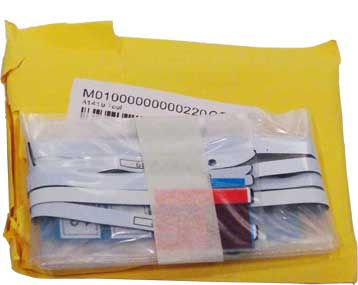 New adhesive kits for 21" and 27" iMacs are required for any internal service; display must be removed to access machine's internal components. Designed to be destroyed when opening machine, these strips must be replaced after service to reinstall display. While tedious, this method of securing the display is actually rather clever - as Apple designed it.
Fake adhesive kits lack the key feature that allows proper removal, namely a thin layer of foam sandwiched between two layers of adhesive. Cutting thru foam layer allows display to be gently opened, disconnected and removed. Bogus kits are nothing more than thick, gummy tape made to look like the real thing, but removing a bogus adhesive kit can be brutal. A small chip on edge of glass turned into a full-length crack in screen, thanks to prior use of a bogus kit. Use the real thing. More on these nasty, fake adhesive kits in "Counterfeit Goods" section.
|
| HP printer becomes PITA Client brought in a new printer/scanner to be setup, still in its box. Unpacked it, installed ink tanks, ran calibration process, then went to download HP's driver. That's was when the fun began.
 Seems HP's driver is posted on Apple's AppStore, which requires login with an AppleID. Need client's AppleID. Seems HP's driver is posted on Apple's AppStore, which requires login with an AppleID. Need client's AppleID.In addition, this HP printer must be setup using a WiFi connection. And, according to the manual, printer will not operate unless connected to WiFi. It might be a handy option in some circumstances, but WiFi should never be mandatory. There's a difference between printing and publishing....
If you want a wireless printer, get one that uses Bluetooth - and make sure it isn't an HP. In fact, we recommend avoiding HP products in general as they typically have the worst software imaginable and nothing to offer Mac users.
|
How times have changed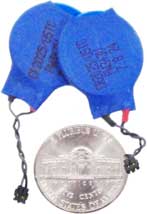 These little nickel-sized guys are capacitors designed for use in the PowerBooks of old, back when batteries could be removed using a simple thumb latch or a coin slot. Every notebook had one. Their purpose was to maintain date/time and other settings, just long enough to allow machine's battery to be swapped out for a fresh one. Nice touch.
Nowadays, removing the battery from most notebooks is a torturous ordeal involving special screws, odd fasteners, delicate lil' connectors, stubborn adhesives and a few dozen steps. Modern batteries might be better than their predecessors, but there are other reasons why one might want to remove the battery besides replacement; a spill into the keyboard, for example.
|
| All gone in a flash Combination of onboard storage (non-removable drive) and new Startup Security "features" (on by default) - combined with no backup - meant there was absolutely nothing we could do when a client's MacBook Pro bit the dust - no troubleshooting, no data recovery, nada, zip, zero.
 Mac OS Ventura and its (default) Security settings guarantee zero access to data
If you don't have a backup, get one. It's only a matter of time.
Default settings (above) prevent access to the Mac, except thru the OS it has onboard, which was no longer available.
|
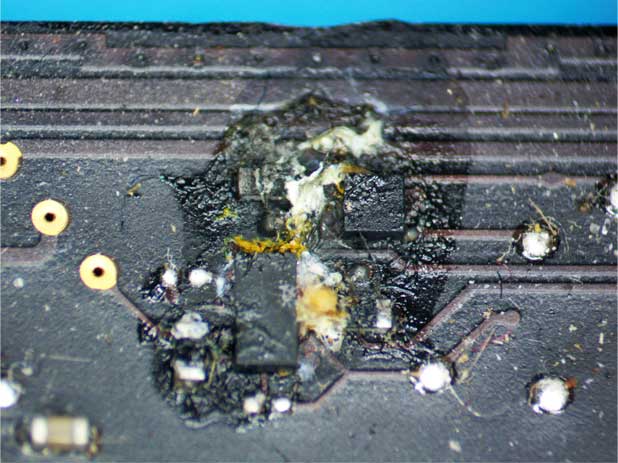
| One drop killed a MacBook Pro Dark area in microscope photo below is a drop of liquid measuring about 4mm in diameter - which was all it took to kill machine's keyboard and trackpad functions. A single drop found its way around logic board's edge and vaporized components.
 |
| Liquid damage while powered on A significant spill thru keyboard fried this notebook's video circuit and display module (connector below), and damaged both trackpad and keyboard.
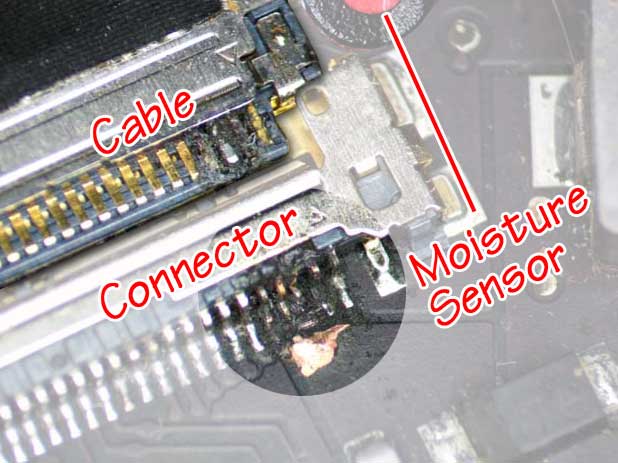 This 11" MacBook Air was a total loss. After doing battle with OS 11 BigSur, data was recovered without having to fall back on client's out-of-date backup.
|
| Runaway Kernel Task (RKT) Symptoms include glacial-speed operation, apparent lack of cursor control, and fans running at full speed (common, but not always). The official Apple explanation is that machine is overheating and doing all it can to cool down, including ramping up fan speed and throttling back processors (CPUs) - but this is not always the case.
If fans are clogged, high temps may indeed throttle CPUs, and Macs typically shut down before damage occurs. (Examples of clogged fans below.) A good cleaning is the solution for this, but excessive heat isn't always to blame. Worse, the problem may be intermittent with brief periods of normal activity. When these symptoms occur without evidence of overheating, it's known as Runaway Kernel Task (RKT). 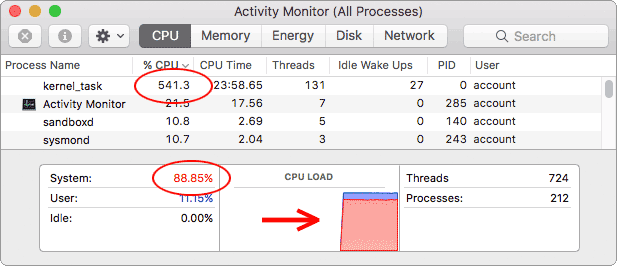 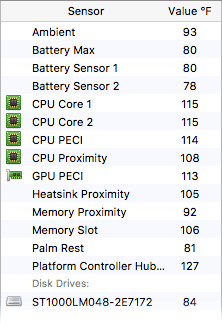 Screen shot above clearly shows runaway kernel task in Activity Monitor window (under OS 10.11) with CPU running at over 540% and CPU load near maximum (89%, arrow).
%CPU number typically fluctuates between 200% and 500% during RKT but may go much higher. Window at right shows temp sensors during event, all of which are near their lowest operating values. Despite low temps, fan(s) may be running full speed, 6200rpm in this case. Data shown here is from MacOS 10.11's Activity Monitor; later versions exclude kernel_task from process list. Kernel_task is missing entirely from 10.14 Mojave's Activity Monitor list, 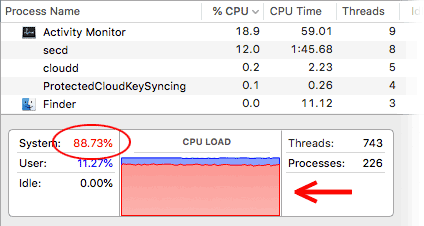 but RKT still shows up under System at almost 89% (circle) and in CPU load (arrow), as with earlier OS versions. but RKT still shows up under System at almost 89% (circle) and in CPU load (arrow), as with earlier OS versions.Temps were same as previous test, near lowest values. Heat is clearly not the issue, but fan(s) run at top speed anyway. RKTs will always show up in Activity Monitor's CPU load graph if active, as shown above, but elevated fan speed isn't always a symptom. Solutions range from a good cleaning (in the case of overheating), to removing peripherals, RAM, drive(s) and testing/replacing components if caused by RKT. Countless suggestions out there, but most are guesses, some are unworkable, others may make matters worse. Only way to determine cause is by bench testing. |
 |
Learning at owner's expense
 Owner stated she had not backed up her data. Owner stated she had not backed up her data.Anything on it you care about? "A few pics maybe."
What happened? "I dunno..... I just want it to work." Drive had been erased and reformatted MS/DOS. Who would do such a thing to a Mac? "I took it to [PC shop]," she said, "but they couldn't help me." Reformat, replace Operating System, and machine was good as new. Unfortunately, the PC shop wiped all data and recovery wasn't an option. |
| All data destroyed for $600
A musician was in town finishing up a music video when the hard drive in his MacBook Pro died. Fortunately, he had a backup. So, he took his machine and
 backup drive to a local PC shop hoping to be back in business ASAP. And that's exactly what should have happened. backup drive to a local PC shop hoping to be back in business ASAP. And that's exactly what should have happened.He showed up here about a week later, complaining that his computer was virtually useless. It had an old OS that couldn't run his music apps and all his files were long gone. Sadly, he was correct on both counts. His backup drive had been erased and reformatted NTFS (DOS/Windows) by some moron; only thing left was a directory of empty folders. We replaced his OS with the proper version, got his editing software and comms working again, and suggested sending his DOA drive to DriveSavers for recovery. (Mechanical failure - it happens.) If he had come here in the first place, he would've been back in business within 24 hours for a lot less than $600.
|
Dubious diagnostic doubleheader This time, both Apple _and_ a local PC shop wasted client's time and money on a very simple and easily solved problem. In fact, we spotted it when client walked in.
He explained that his son's MacBook Pro kept shutting off at random and had been left in a closet for six months because it couldn't be fixed. They'd taken it to Apple where it got a new Operating System that didn't fix it, then took it to a PC shop where its SSD was (needlessly) replaced. When problem kept reoccurring, they returned the new SSD, got a refund, and into the closet it went. When dad walked in with the notebook and a cheap AC-adapter from Amazon, the problem was obvious. Adapter produced about half of machine's required 87w; anything less than proper wattage is asking for trouble and can cause damage. Machine couldn't run and charge its battery, so it goes down. Problem solved with a legitimate charger. But, at client's request, we stressed its CPU/GPU for two hours while monitoring temps and charging battery. Machine never faltered, sensors never exceeded a cool 108F, battery charged to 100%, and we tracked down a new 87w adapter for him. Client left happy, bogus adapter went into the trash. |
iMac sets new malware record Machine was so slow that owners thought they needed to replace it. Was it the kids downloading games? Adults downloading garbage? Turned out to be both. Over the course of three days, we picked-out and deleted a whopping 6GB of junk from this iMac, 6,000 files in the first pass alone. Machine was so slow that owners thought they needed to replace it. Was it the kids downloading games? Adults downloading garbage? Turned out to be both. Over the course of three days, we picked-out and deleted a whopping 6GB of junk from this iMac, 6,000 files in the first pass alone.Besides an assortment of unwanted games, they downloaded practically every phony PDF app, fake video viewer and sham "updater" they came across, along with all the bogus Mac fixup/speedup/screwup utilities that they could find. Even had one called "MacUpper" which, I guess, is a nod to tweakers wanting a faster computer. No joke, before we were finished we had removed a two-page list of malicious apps and adware, not including outdated/expired programs. Afterward, the iMac was operational but still seemed a bit skittish, so we decided to replace its banged-up OS as well. That was when the internal hard drive gave up the ghost (code 8). Luckily, we'd already copied everything off. Machine left the shop after a good cleaning of fans, boards and vents, a fresh (upgraded) OS and a new drive -with all client data intact. |
| Screwed-up power An iMac arrived DOA with a dent in lower-right corner below screen. Glass wasn't cracked or broken, display looked to be intact. Owner said the glass had been replaced and machine serviced at BestBuy shortly before it died.
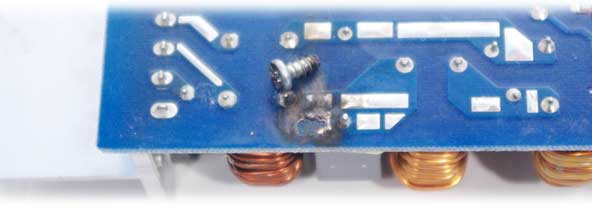 iMac power supply destroyed by a loose screw
We disassembled machine to find a screw welded to the back of its display; directly opposite the screw was a burn mark on the iMac's power supply (above). Other screws were missing, some had been stripped, masking tape had been used to secure cables. Two plastic mounts were broken, leaving the remaining pair of screws to hold power supply in place. Part of one mount still held its screw to power supply, but the other screw had fallen out and caused damage.
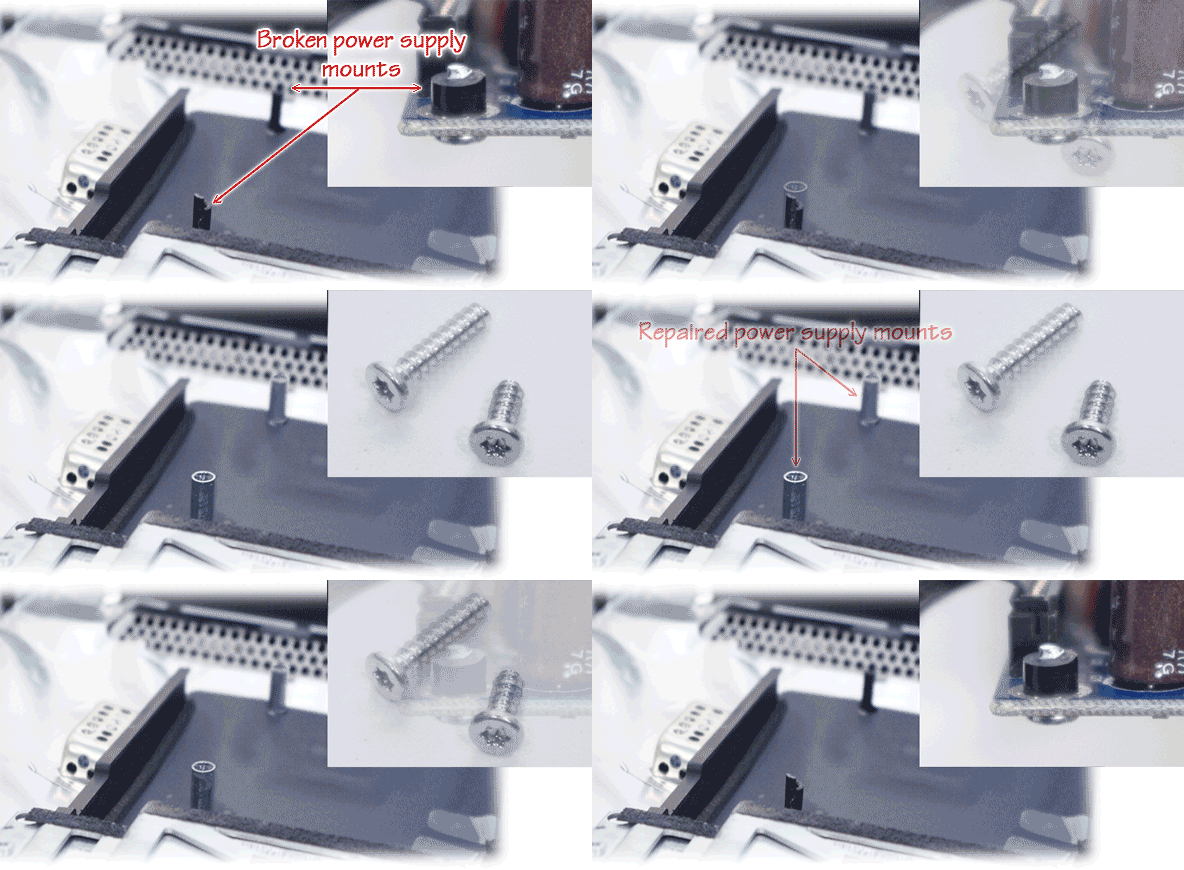 W reinforced and repaired both plastic mounts and used longer screws to make certain the problem couldn't happen again. Fortunately, damage was limited to the power supply and replacing it brought this machine back to life.
|
|
When this notebook arrived following an "upgrade" by a local PC tech, it had no signs of life other than fans running at full speed. Among other problems, we found missing, loose and stripped screws; pinched and incorrectly routed cables; and an unsecured hard drive.
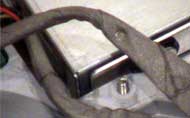 Photo tells all: Misplaced long screw protrudes thru frame where it drilled the DC-power cable dead-center. Bare copper is visible around edge of indentation, revealing short circuit to ground. Hard drive data was intact, but machine was fried. |
Mishandled Macs 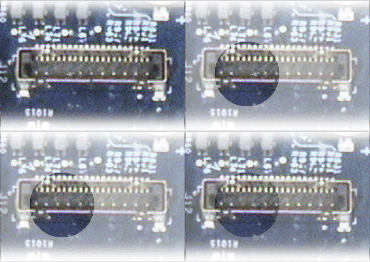 In order service this particular machine, all cables must be disconnected from the logic board, including display's video connector (enlarged here x5). When this machine arrived, it booted to a Kernel Panic with a monitor displaying only shades of red. Careless assembly and a mashed video connector turned out the be the cause. In order service this particular machine, all cables must be disconnected from the logic board, including display's video connector (enlarged here x5). When this machine arrived, it booted to a Kernel Panic with a monitor displaying only shades of red. Careless assembly and a mashed video connector turned out the be the cause.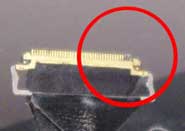 Another one, this time the backlight pins on a display LVDS cable have been destroyed - actually bent and broken - by someone forcing it into socket an an angle. Only fix is to replace the entire display module, a costly mistake. These connectors are delicate and must be handled with care. 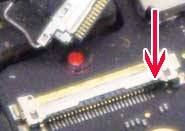 And here's the logic board socket of another LVDS connector, this one destroyed by liquid. Moisture sensor under cable has turned red, and liquid shorted the high-power backlight pins. Those two pins happen to be right next to each other, only separated by a hair, so the slightest hint of moisture is enough to cause a short. And here's the logic board socket of another LVDS connector, this one destroyed by liquid. Moisture sensor under cable has turned red, and liquid shorted the high-power backlight pins. Those two pins happen to be right next to each other, only separated by a hair, so the slightest hint of moisture is enough to cause a short. |
| Another PC shop refugee An iMac arrived after three trips to a local PC shop. Owner took it in for a hard drive upgrade and things went downhill from there. Drive was installed, but so was a nasty and useless app called Bit Defender. A subsequent OS upgrade also went awry. Then, placing the iMac into his car for the trip home, its display fell off chipping the glass.
 Machine arrived here because key programs no longer worked, emails were missing, and it had no audio output to headphones. Removed Bit Defender, completed updates, fixed key apps, found a mystery folder named "From PC" containing emails and missing OS files.
That left the headphone audio-output issue. System Profile and Sound Preferences had no indication that a headphone circuit even existed. Best guess: the tiny connector shown above (in photo from another Mac) was left disconnected when machine was sealed up. Client chose to order a $16 USB audio adapter rather than have his iMac disassembled again.
|
| All-time weird recovery
Client brought in his wife's notebook. Said wine had been spilled on it when new, he'd paid Apple $750 to replace logic board and machine was fine - until lately. Back to Apple, he was told it needed a new logic board, new optical drive and a new hard drive. He canceled the repair order, and the notebook was returned to him from a facility somewhere in Tennessee (at no charge) with a letter and report bearing Apple's letterhead. And now, the notebook's display had gone black, too. 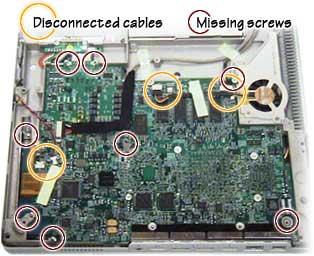 |
 |
| Notebooks with drinking problems Spilling liquid into a modern MacBook Pro or MacBook Air is a costly disaster
 these days, for a variety of reasons. Moisture sensors void warranty, and a tiny amount of liquid can do major damage. Micro components and compact construction also adds to potential damage. these days, for a variety of reasons. Moisture sensors void warranty, and a tiny amount of liquid can do major damage. Micro components and compact construction also adds to potential damage.Modern machines are assembled into top case, which means complete disassembly to replace top case and keyboard, which is all but guaranteed to be damaged in a spill. This is why we highly recommend keyboard covers for laptops (links on home page). 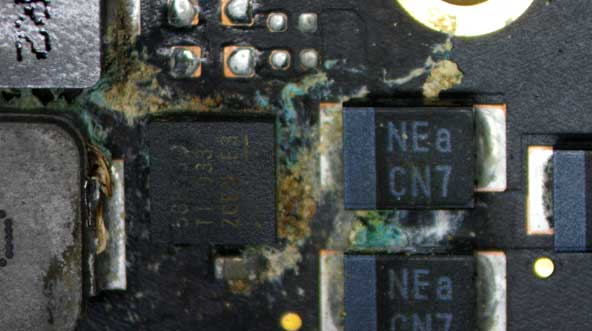 If liquid gets thru keyboard to logic board, odds of machine working properly again are slim. Even if it can be brought back, it's quite likely that corrosion will cause another failure soon. Apple won't touch a machine that has liquid damage - and we now have to agree. Photo above was taken thru a scope and shows corrosion attacking copper traces within 24 hours of a spill - but corrosion isn't what did this MacBook in; it was powered on at the time and critical components got fried.
|
More spills, corrosion and... critters?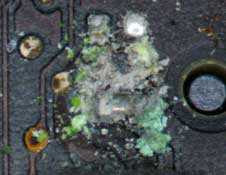 Wonder what this used to be? Here is an example of some completely dissolved components, only one spot of many on this board. There used to be at least two resistors and two capacitors here, before they all vanished into a cluster of green and gray crystals. These components are about the size of ground pepper, so it doesn't take much to make 'em disappear. Wonder what this used to be? Here is an example of some completely dissolved components, only one spot of many on this board. There used to be at least two resistors and two capacitors here, before they all vanished into a cluster of green and gray crystals. These components are about the size of ground pepper, so it doesn't take much to make 'em disappear. |
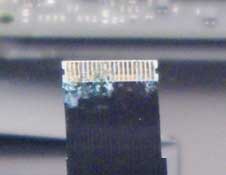 No sign of a spill, no residue and no moisture sensors triggered in this MacBook Air, yet it had enough corrosion inside to prevent operation. Machine spent a few months in Australia and failed the moment it returned to the States, arriving at the shop next day. Interior was clean and completely dry. Going from a warm aircraft into a winter storm was possible cause. No sign of a spill, no residue and no moisture sensors triggered in this MacBook Air, yet it had enough corrosion inside to prevent operation. Machine spent a few months in Australia and failed the moment it returned to the States, arriving at the shop next day. Interior was clean and completely dry. Going from a warm aircraft into a winter storm was possible cause. |
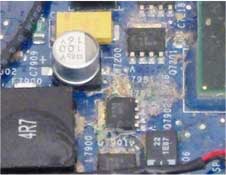 Notebook spills seldom end well. If it's beer, wine, tea, coffee, juice - whatever the liquid was, it's likely to leave residue and cause corrosion over time. If device was not powered on, and spill was non-corrosive, it might work again if promptly disassembled, cleaned and dried without delay. People seem compelled to immediately power on after a spill to see if it still works. Notebook spills seldom end well. If it's beer, wine, tea, coffee, juice - whatever the liquid was, it's likely to leave residue and cause corrosion over time. If device was not powered on, and spill was non-corrosive, it might work again if promptly disassembled, cleaned and dried without delay. People seem compelled to immediately power on after a spill to see if it still works. |
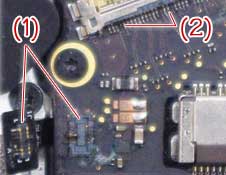 This MacBook Pro sat long enough to have some copper dissolve completely. #1 shows remains of keyboard backlight connector, #2 shows missing traces at display. When machine lost video after glitching for awhile, it came to the shop - too far gone and beyond reasonable repair. Cost of logic board and service would exceed value of this machine. This MacBook Pro sat long enough to have some copper dissolve completely. #1 shows remains of keyboard backlight connector, #2 shows missing traces at display. When machine lost video after glitching for awhile, it came to the shop - too far gone and beyond reasonable repair. Cost of logic board and service would exceed value of this machine. |
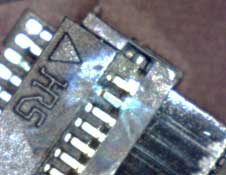 Visual signs of a recent spill are subtle and difficult to find without inspection under a scope. In yet another spill-damaged machine, a drop of water found its way thru keyboard onto a pair of microscopic pins; clear evidence of the resulting spark is seen when magnified. We brought this MacBook Air back to life, fully functional again, despite last rites from Apple. Visual signs of a recent spill are subtle and difficult to find without inspection under a scope. In yet another spill-damaged machine, a drop of water found its way thru keyboard onto a pair of microscopic pins; clear evidence of the resulting spark is seen when magnified. We brought this MacBook Air back to life, fully functional again, despite last rites from Apple. |
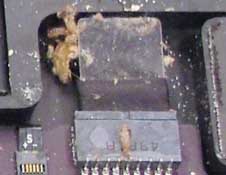 "Girlfriend spilled something into her MacBook Air awhile back, would you take a look at it?" I was greeted by eight colonies of dead critters (like the group pictured, left). Eggs, bug poo and lots of green, fuzzy stuff. Disgusting! SSD tested fine, but logic board and keyboard were destroyed. Machine sat here for months until disposal, only its SSD remains (with unpaid bill). "Girlfriend spilled something into her MacBook Air awhile back, would you take a look at it?" I was greeted by eight colonies of dead critters (like the group pictured, left). Eggs, bug poo and lots of green, fuzzy stuff. Disgusting! SSD tested fine, but logic board and keyboard were destroyed. Machine sat here for months until disposal, only its SSD remains (with unpaid bill). |
| What else did you forget to mention? MacBook Pro arrived with a damaged screen. Display module's inner frame had broken an inch or two above a hinge, and opening/closing notebook was prying its display apart. (Apparently a weak frame on this model.) Client was present when we removed the back and discovered what you see below. All bets are off.
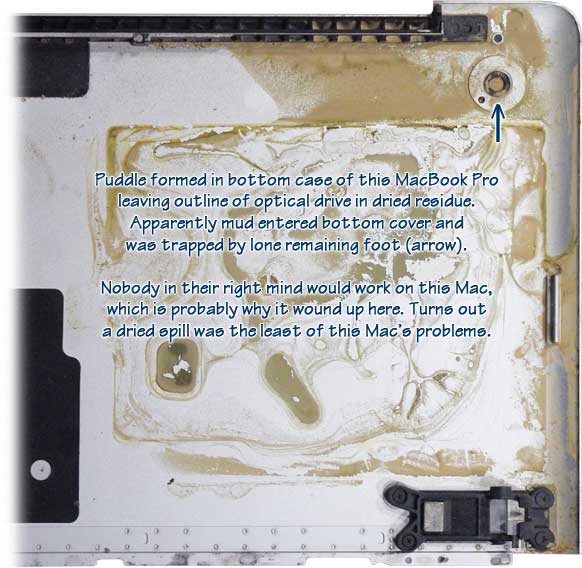 Using an external monitor, we managed to boot it up and tested all keys on the keyboard. All worked perfectly, so there's no way this much liquid entered thru notebook's keyboard. After a thorough disassembly and cleaning, we found the broken tip of a headphone plug buried in headphone jack, eliminating audio. It had no wifi functions, battery was showing its age, and a head-stripped fan screw had to be surgically removed. All that and a broken display, too. We managed to fix display housing and hinge without replacing the entire display module (not recommended), then got wifi working. Replaced all four missing hard drive mounts and a few other missing screws, removed and replaced the stripped fan screw, replaced missing feet, even got the optical drive to burn a DVD and got audio output back. Needs a new battery, but this machine returned from the grave in pretty good shape. |
Urine trouble?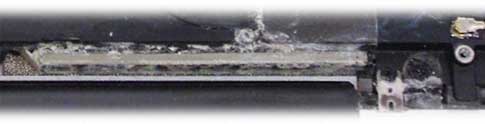 Ewww, yech! A pMac... instant corrosion. The only thing to come of this was an entertaining tale of woe and a wasted pair of rubber gloves. Seems owner's boyfriend peed on her 'puter. Machine was DOA. Boyfriend too, most likely.
|
Acid washed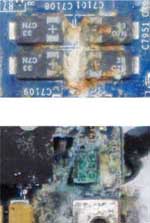 And here's what vomit does to a notebook (in this case, cat puke). When this machine arrived - hours after some poor puddytat had spewed into its keyboard and ports - battery was still connected, fan was going full-tilt, machine was sizzling hot - and just a bit odoriferous. And here's what vomit does to a notebook (in this case, cat puke). When this machine arrived - hours after some poor puddytat had spewed into its keyboard and ports - battery was still connected, fan was going full-tilt, machine was sizzling hot - and just a bit odoriferous.With the perfect combination of corrosive liquid and heat to accelerate logic board's demise, it arrived baked to perfection. There's no recovery from this kind of destruction. It was D-U-N, done. |
 |
|
A little leverage goes a long way
This MacBook Air arrived with "loose hinges" that were too weak to hold up display properly. Airs are so light, being able to open 'em one-handed leaves just enough hinge tension to support display (under normal conditions). Between little or no hinge tension and having loose screws, this one was flopping open and shut unless balanced just so.
Removed display and clutch cover to find the screws were indeed loose, but worse than that, both hinges were broken (blue arrows). Replace hinges? Not possible. All cables to display, camera and wireless antennas pass thru the center of these hinges (red arrows), meaning a whole new display was the only option. 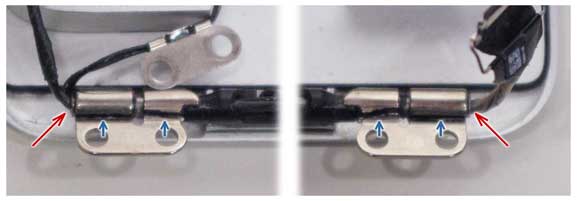 |
| Shocking! Power strip goes kaput
Nothing like plugging your computer into a power strip only to hear a pop and catch a whiff of ozone. Photo below is an opened-up Rhino-brand surge protector. Nice.
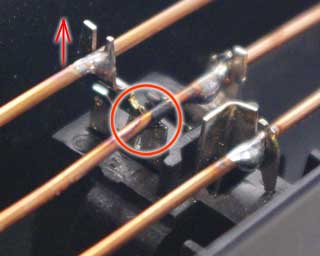 This is the back of the outlet that shorted, one of 12 inside this Rhino's steel housing. All 12 outlets are wired in parallel using bare solid copper wire; top wire is hot, middle is neutral, bottom is ground. This is the back of the outlet that shorted, one of 12 inside this Rhino's steel housing. All 12 outlets are wired in parallel using bare solid copper wire; top wire is hot, middle is neutral, bottom is ground.Plug pushed top (hot) connector free of its no-name plastic housing, into neutral copper wire next to it. Lucky nobody got hurt by this obvious design flaw. |
What's cookin'?
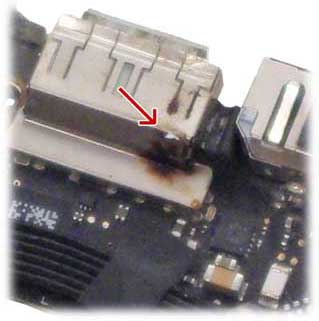 The I/O board from a MB Air, that's what. A tiny bit o'metal in just the wrong place was enough to make this USB port too hot to handle within a matter of seconds (DC-in board is right next door). The I/O board from a MB Air, that's what. A tiny bit o'metal in just the wrong place was enough to make this USB port too hot to handle within a matter of seconds (DC-in board is right next door).Smell of burning electronics was unmistakable, arrow points to obvious scorch mark where rear of USB port housing meets machine's keyboard. Had it been USB port on other side of machine, it would have meant replacing logic board. |
How old is this thing? 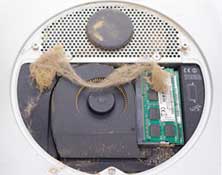 Mac Mini purchased online by client was probably sold as "refurbished" and came with a boatload of pirate (stolen) software. Arrived here a few weeks later with a dead 8-year-old hard drive. Mac Mini purchased online by client was probably sold as "refurbished" and came with a boatload of pirate (stolen) software. Arrived here a few weeks later with a dead 8-year-old hard drive.Removing bottom cover revealed cobwebs in a machine packed with dust. But..... a thorough cleaning, new drive and OS put it back in service. |
Mah biscuits are burnin'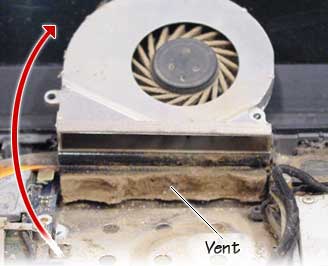 Your Mac has temp sensors and cooling fans to protect it from overheating. If sensors detect excessive heat over 150F or so, machine will shut itself off. Its cooling system is remarkably effective - unless it looks like this. Your Mac has temp sensors and cooling fans to protect it from overheating. If sensors detect excessive heat over 150F or so, machine will shut itself off. Its cooling system is remarkably effective - unless it looks like this.Lifting fan reveals a thick layer of lint sealing off fan exhaust and causing this MacBook to overheat and shutdown (as it should). Another machine (below) also clogged with lint and dust. Owner noticed it was getting very hot and brought it in for a cleaning when it began shutting itself off. Both MacBooks were back in service following a complete cleaning with no harm done, testimony to the durability and design of Macintosh notebooks. 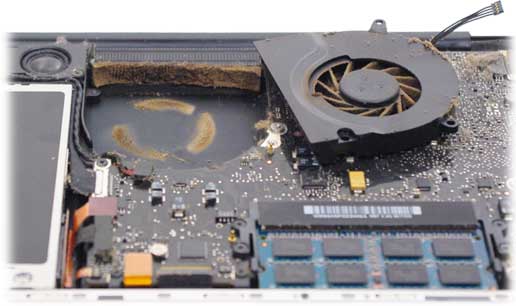 Below is a fairly typical (older) iMac after a few years in a relatively clean environment. iMacs have multiple fans to assist with cooling by convection and seldom suffer heat-related issues as notebooks might, but they all collect dust just the same. (Machine came in for unrelated services.) 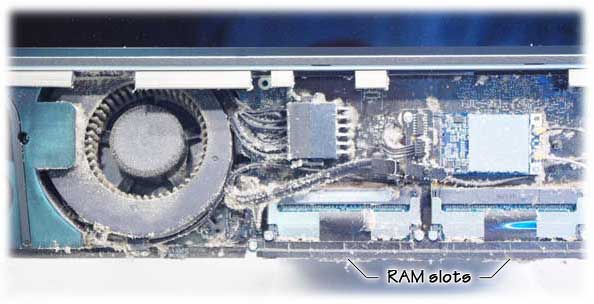 |
Bang Ding Ow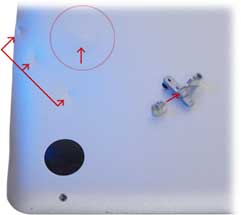 This MacBook Pro took a hit on its bottom side (3 arrows), hard enough to dislodge its hard drive - which then dented bottom case in outward direction (circle/arrow). Display mount was broken, and hard drive ceased to function on impact with a shock sufficient to destroy machine's optical drive as well. Fortunately, the owner of this Mac had a complete, proper back-up of all his data. We replaced hard drive, restored data, and replaced the optical drive. This MacBook Pro took a hit on its bottom side (3 arrows), hard enough to dislodge its hard drive - which then dented bottom case in outward direction (circle/arrow). Display mount was broken, and hard drive ceased to function on impact with a shock sufficient to destroy machine's optical drive as well. Fortunately, the owner of this Mac had a complete, proper back-up of all his data. We replaced hard drive, restored data, and replaced the optical drive.Update: Machine came back after being dropped again two years later. And again, the hard drive was kaput. BTW: "Bang Ding Ow" is from a notorious local newscast, see it here (37sec.)
|
| Swollen MacBook batteries We've seen plenty of distorted laptop batteries over the years, and here are a few that went ignored for far too long.
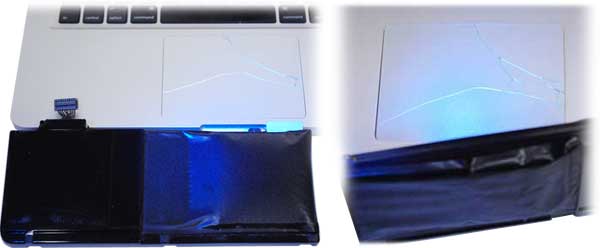 These two MacBook Pro machines had remarkably similar damage, one was only three years old when battery broke its trackpad.
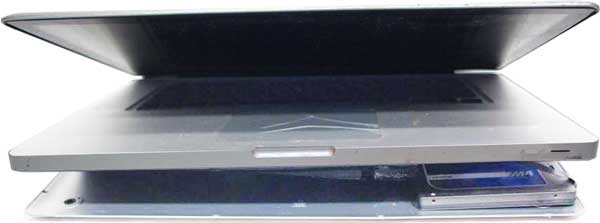 Caller said she had malware slowing machine's operation; this is the machine she brought in, above - exactly as it arrived. Battery destroyed trackpad, then broke bottom case, revealing a solid-state drive dangling from its ribbon cable. We removed the bogus utility apps, adware and garbage she had downloaded - then replaced battery, trackpad, missing drive mounts and missing screws. But... a week later she was back after having downloaded more malware. 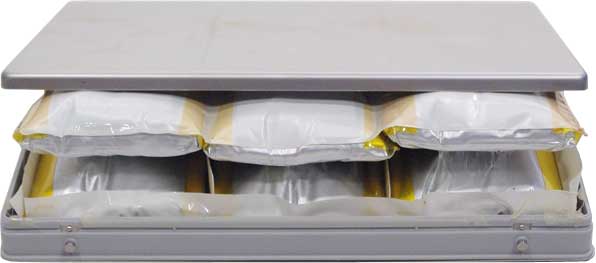 One of the last easily removable MacBook batteries. All six cells are just about ready to burst after breaking out of notebook and splitting housing.
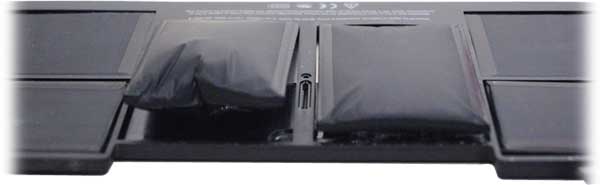 And finally, a MacBook Air battery that also broke trackpad and case. |
| 540GB of data on 500GB hard drive Until recently I would've said that was impossible, but I'd be wrong. After a very long and twisted data recovery process using three backup drives with two OS replacements - along with every bug and glitch imaginable - we did indeed end up with 540GB of data recovered from a 500GB drive. And this on a machine that had been declared dead by Apple.
One of the strangest jobs to come along in years, it quickly became such a challenge that billing was soon suspended to allow for some unconventional experimentation (on a cloned copy, of course). First clue: User's Home Folder reported zeroK content + 885MB shared folder = 455GB total data. Common Core math? Drive had every app ever made onboard, with no less than 15 of 'em launching on startup. Worst of all, it was encrypted (compressed) - which is why content exceeded drive capacity when it finally hit the wall. Needless to say, client was happy to get all that data back, plus a fully-functional machine to boot (so to speak). |
| Canadian OS, eh? What you see below is a screen dump of the Finder, showing one possible aftermath of running out of space on a hard drive while doing some heavy lifting.
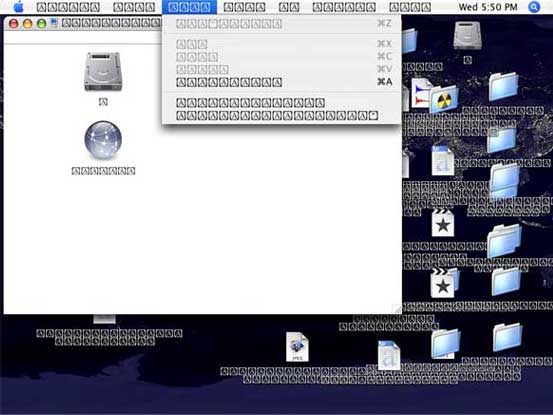 A recording studio was in full flight, mixing down tracks while simultaneously copying audio files and running other apps in the background, when machine ran out of drive space and crashed
"I could tell things weren't quite right," the engineer told me, "but I just had to get this one last job finished." With processors going full-tilt and a massive amount of data on the move (warnings ignored), it was lights out, game over. After a forced restart, he was horrified to see screens full of gibberish. We recovered all data, made repairs and (strongly) recommended having backup.
|
| Time stands still This machine was only about a week old when it arrived here at the shop. Owners were trying to reinstall its Operating System (for some reason) and needed help. Photo shows System install screen underway - but it quickly became apparent that an OS install was only part of what this Mac needed.
 During installation, progress bar and video froze. Moving install window around would cause screen to refresh momentarily, but video card was defective (replaced by Apple under warranty). And, to make matters worse, the OS install disk that came with this 27" iMac was also defective (next entry). |
Hello, Quality Control? A defective System DVD (back when the OS came on DVDs) hampered owner's attempts to reinstall OS; disc is missing part of its reflective metallic layer near edge, looks almost like a fingerprint. We connected owners with Apple Support and saw to it that situation was rectified. A defective System DVD (back when the OS came on DVDs) hampered owner's attempts to reinstall OS; disc is missing part of its reflective metallic layer near edge, looks almost like a fingerprint. We connected owners with Apple Support and saw to it that situation was rectified. |
Assembled in Chian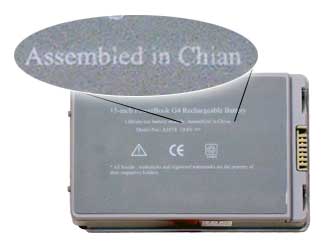
Ya say your notebook won't power up? This cheapo made in "Chian" battery wound up costing its owner dearly.
We've seen damage done from cheap knock-off AC adapters, too; they may overheat, short out, blacken charge port, destroy circuits, batteries and DC-in boards - and they wreak havoc on power management. You get what you pay for. Spare yourself the grief caused by counterfeit goods and get the genuine article. |
| Parts is parts. Unless there aren't any parts. Newer Mac laptop models have display modules that cannot be
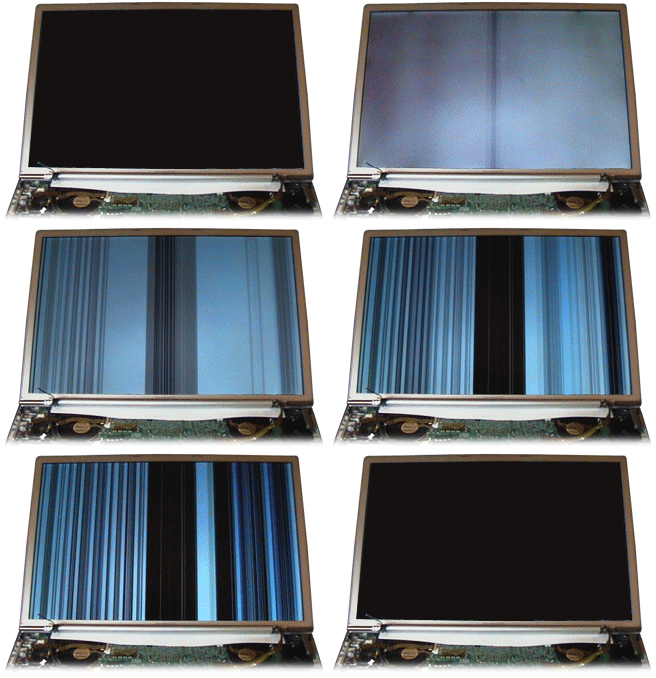 serviced or repaired, only replaced, and a replacement display was not available at the time. What you see is a notebook starting up after being dropped. The first light gray vertical lines are boot screen with logo/gear. Any screen animation caused vertical lines to dance about like a deranged bar code. With no replacement available, it ended up connected to an external display. serviced or repaired, only replaced, and a replacement display was not available at the time. What you see is a notebook starting up after being dropped. The first light gray vertical lines are boot screen with logo/gear. Any screen animation caused vertical lines to dance about like a deranged bar code. With no replacement available, it ended up connected to an external display. |
Broken Logic Pro key A form of copy protection, some apps back in the day required a USB "key" to be in place before the application will launch and function. We repaired this one with a new plug, a little solder and some plastic casting. Wasn't pretty, but it worked and got our client off the hook. A form of copy protection, some apps back in the day required a USB "key" to be in place before the application will launch and function. We repaired this one with a new plug, a little solder and some plastic casting. Wasn't pretty, but it worked and got our client off the hook. |
Trouble on the web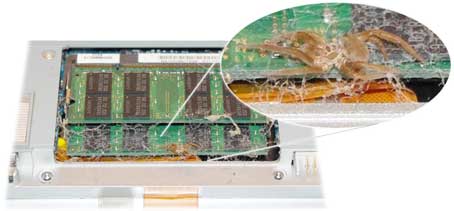 Here's a Mac with an honest-to-goodness bug. Appears to have been in there for awhile, but we were too late to save his fuzzy little cephalothorax.
|
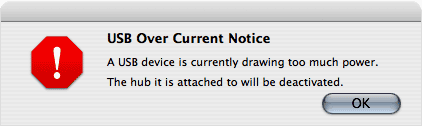
| Internal short on USB bus Nice to know the Mac has built-in protections for various faults, including this one. Port was damaged and shorting to ground.
 |
Mini discs = bad news in slot-load drives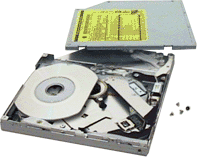 Here's a CD wedgie courtesy of the U.S. Air Force. Here's a CD wedgie courtesy of the U.S. Air Force. Funky lil' mini-discs are shoved to the back of optical drives (CD/DVD drive), where they get lodged and cannot eject. Removal and disassembly of drive was the only solution. Good news is, no harm done and this machine was ready to fly in no time. Another drive we encountered proved to be rather curious: We found (a record!) three full-size CDs stuffed inside a single slot-loading SuperDrive. Dunno how that was accomplished (nor why anyone would do such a thing), but after removal and reassembly the drive was again fully functional.
|
Job with a built-in tip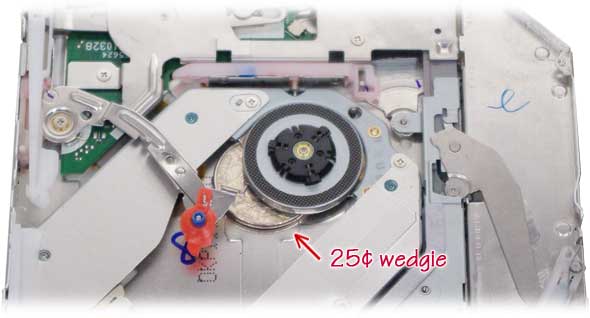 We've removed lots of things from optical drives, including SD cards, credit cards, tiny glass beads, loads o'rice - and this quarter stuck under capstan. All survived the operation and lived to read another day.
|
Possible fire damage?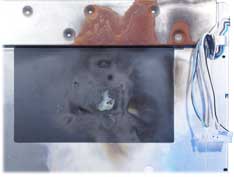 Back of this display from an older iMac clearly shows heat damage near machine's fan and even some rust above it, suggesting steam from having been in a fire at some time in its life. Macs are well protected from overheating by sensors; they may spin down drives and go to sleep or turn themselves off if condition persists. There's simply no way a computer can generate the kind of heat required to do this sort of damage, but we never got the whole story...
|
Might wanna take a break there, bucko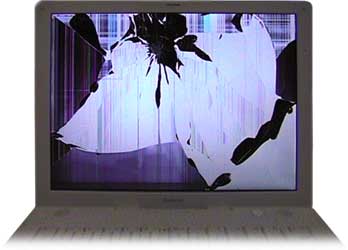 About the fifth time this poor guy entered a page full of info on some web site, only to see it all disappear with an error - again - he delivered a right cross to the screen of his girlfriend's notebook.
It was a costly repair, but machine left here in great shape and client wasn't forced to crash on the shop sofa. |
| Display Burnout LCD displays use tiny CCFL tubes to light up the screen - these
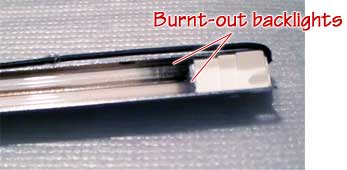 measure .095" diameter, less than a tenth of an inch. This pair came from an iMac screen that had two at the top and two at bottom (some displays have 'em on sides). These tiny glass tubes can be quite long, making them extremely delicate and hard to handle. They seldom go bad, but when they do they can act just like any other fluorescent tube. (Apple began the industry transition away from CCFLs to LED backlights in 2007.) measure .095" diameter, less than a tenth of an inch. This pair came from an iMac screen that had two at the top and two at bottom (some displays have 'em on sides). These tiny glass tubes can be quite long, making them extremely delicate and hard to handle. They seldom go bad, but when they do they can act just like any other fluorescent tube. (Apple began the industry transition away from CCFLs to LED backlights in 2007.) |
| Blown component Client said he heard a pop and machine suddenly went dead. After trying all the usual suspects (power supply, button, ports and controls, cables and connections, etc.), only thing left was to continue disassembly until something turned up.
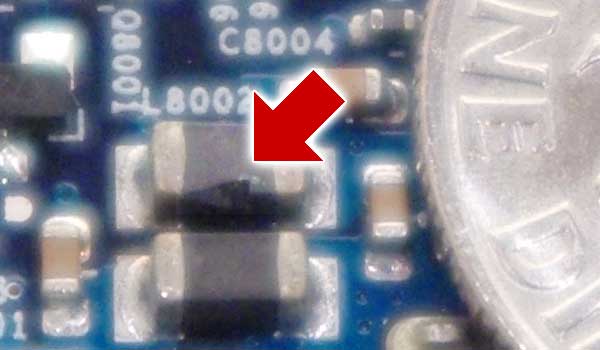 After cleaning and close examination, everything looked perfectly normal - until we removed logic board. An ever-so-tiny scorch mark on bottom case pointed to the blown capacitor pictured above (next to a dime). Continuity check verified failure. Given age and street value of this particular Mac, owner opted to replace machine rather than make repairs.
|
| Heart breaker An absolutely pristine (2011) 17" MacBook Pro without so much as a fingerprint on it arrived DOA. It was wearing a clear plastic cover, kept in a case, obviously very well cared for and lovingly handled during its 6 or 7-year lifespan.
 Autopsy took 5 minutes. All too familiar, this one; the notorious self-destructing NVIDIA 8600M graphics processor. Apple replaced logic boards in these machines due to GPU failure in a free program that ended on Pearl Harbor Day of 2012.
|
 |
| Minor design flaws Apple design criteria and goals have always been cutting-edge, many of which earned entry into museums of modern art and design. Apple now enjoys widespread recognition as the industry leader and continues to set the bar for manufacturing and product design. Over the years some Apple designs have been so exotic and unconventional as to create special circumstances that might be viewed as, well, flawed.
One prime example of an over-the-top Apple design that merits special consideration is the G4 Cube released in 2000.
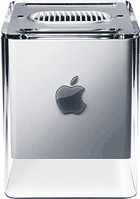 This Mac had a 7-inch cube-shaped core (descended from the 1988 NeXT Cube), released and extracted from under its case by a spring-loaded handle. The G4 Cube, first of the G4 PowerMacs, was unveiled at the San Francisco MacWorld Expo, displayed inside a tall glass tube with its core suspended over inverted case. This Mac had a 7-inch cube-shaped core (descended from the 1988 NeXT Cube), released and extracted from under its case by a spring-loaded handle. The G4 Cube, first of the G4 PowerMacs, was unveiled at the San Francisco MacWorld Expo, displayed inside a tall glass tube with its core suspended over inverted case.While the design was as spectacular as it is unique, it had a few characteristics that proved to be something of a drawback, such as having all ports on the bottom of the machine where they were hard to access, and a disc drive that popped CDs out the top like a toaster but would weaken over time and refuse to eject. Minor flaws, really, and easily overlooked by those who appreciated stunning design concept and execution back in the day.
We have a hopped-up 450MHz G4 Cube here in the shop that runs OS 10.3.9 Panther and plays iTunes all day, every day, from its vintage IDE hard drive.
|
| Major considerations Design flaws considered significant are those which go beyond minor irritations and lead straight to costly service. Here's one "flaw" so blatant as to have been completely overlooked.
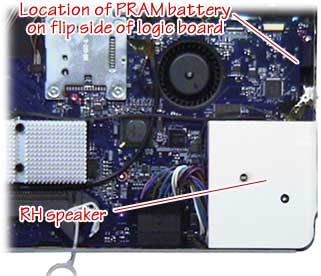 Like all computers, this iMac had a PRAM battery on its logic board with a life span of five years or so. When time for replacement came, owners were in for a nasty shock: Replacing this button battery required removal of outer case, shields, sub assemblies, cables, display, speakers, fans, drives, and logic board. Just to access a $3 battery. This iMac's predecessor was extremely easy to service - and the following model was completely redesigned and quite elegant, too - but this particular transition machine got caught in the middle with internals designed to be serviced from the rear, inside a case that opened from the front.
|
| Notorious design issues: Photo (right) shows broken hinges from a Titanium-case PowerBook (aka TiBook). This
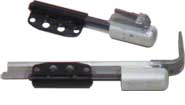 problem was all too common on this 2002 model. Damage was compounded by the fact that replacing a hinge required replacing the entire $700 display - at least as far as Apple was concerned - and that's exactly what Apple did for all warranty repairs. A cottage industry sprang up for those who weren't covered, offering stainless steel replacement hinges installed to existing display, but it was still an expensive fix. problem was all too common on this 2002 model. Damage was compounded by the fact that replacing a hinge required replacing the entire $700 display - at least as far as Apple was concerned - and that's exactly what Apple did for all warranty repairs. A cottage industry sprang up for those who weren't covered, offering stainless steel replacement hinges installed to existing display, but it was still an expensive fix. |
Common (unavoidable) design issues: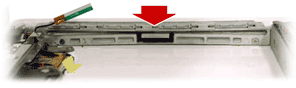 Notebook optical drive slots (shown here from inside machine, drive removed) consist of a 5-inch-wide opening that is difficult to reinforce. This one had its aluminum support frame bent, effectively closing slot and rendering the optical drive useless. Not exactly a "design flaw" per-se, but a weakness common to all notebooks equipped with CD/DVD drives. Notebook optical drive slots (shown here from inside machine, drive removed) consist of a 5-inch-wide opening that is difficult to reinforce. This one had its aluminum support frame bent, effectively closing slot and rendering the optical drive useless. Not exactly a "design flaw" per-se, but a weakness common to all notebooks equipped with CD/DVD drives.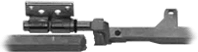
Another beat-up notebook, this one with a broken frame making machine's display a little wobbly. Added stress on hinges typically caused eventual damage to nearby cables leading to display failure. |
Pin Grid Array -vs- Land Grid Array -vs- Ball Grid Array
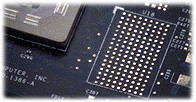 All notebooks have tiny video cards onboard, usually soldered to the logic board by way of a Ball Grid Array (BGA, pads shown at left). These provide good heat transfer and a more compact assembly, but if BGA fails, video and logic board may go with it. All notebooks have tiny video cards onboard, usually soldered to the logic board by way of a Ball Grid Array (BGA, pads shown at left). These provide good heat transfer and a more compact assembly, but if BGA fails, video and logic board may go with it.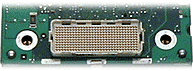 Early machines used a detachable Pin Grid Array with plug/socket arrangement for daughtercards (right) that seldom caused problems and also allowed for upgrades. The third method, Land Grid Array, consists of leads fanning out from a chip's perimeter that are soldered to circuit board, a very common and robust type of surface-mount technology. Early machines used a detachable Pin Grid Array with plug/socket arrangement for daughtercards (right) that seldom caused problems and also allowed for upgrades. The third method, Land Grid Array, consists of leads fanning out from a chip's perimeter that are soldered to circuit board, a very common and robust type of surface-mount technology.A compromised BGA is difficult to repair, but is possible using an expensive process called "reballing" (which isn't nearly as much fun as it may sound). Failed video may mean replacement of entire logic board, replacement and reballing a new graphics processor (GPU), or reballing existing GPU if a new one is not available. BGAs are the most complex of miniaturized connections commonly used in notebooks, and a good example of what makes notebooks more fragile than desktop machines and towers. It's also one reason we recommend consideration of an extended factory warranty from manufacturer when buying an expensive notebook computer. |
 |
| "Pry it open, let's see what's in there..."
This next machine was still (somewhat) functional when it arrived, although its fans went on full-tilt moments after startup, and screen would blackout periodically. Kids took a screwdriver to mom's $2K notebook. 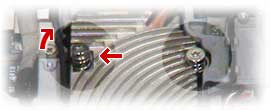 Many screws were stripped, missing and broken, including a critical heat sink mount over processor that was lifting heatsink and causing a noticeable bulge in top case and keyboard (red arrows). 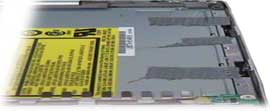 Optical drive had apparently been pried out, too (mounts and bezel broken), then stuffed back in using duct tape. We were able to repair everything, including machine's SuperDrive, but - unfortunately - damage to the optical drive ATA bus prevented drive from functioning. Machine was reassembled sans optical drive, and repaired SuperDrive placed into an external enclosure. Optical drive had apparently been pried out, too (mounts and bezel broken), then stuffed back in using duct tape. We were able to repair everything, including machine's SuperDrive, but - unfortunately - damage to the optical drive ATA bus prevented drive from functioning. Machine was reassembled sans optical drive, and repaired SuperDrive placed into an external enclosure. |
Do-it-yourself upgrade: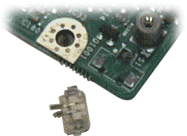 Owner's goal was to upgrade his laptop's hard drive, but it never happened. After obtaining a drive that might have fit, he carefully disassembled his notebook until he got to the logic board. Attempting to disconnect a tiny plug, he pulled entire connector off the logic board - traces, solder and all. We reconstructed the board's tiny copper traces and successfully repaired connector for him, then tested logic board, but alas... When he took the board home and tried to reassemble his notebook, the display blacked-out when he accidentally destroyed machine's video circuit. Oops. Owner's goal was to upgrade his laptop's hard drive, but it never happened. After obtaining a drive that might have fit, he carefully disassembled his notebook until he got to the logic board. Attempting to disconnect a tiny plug, he pulled entire connector off the logic board - traces, solder and all. We reconstructed the board's tiny copper traces and successfully repaired connector for him, then tested logic board, but alas... When he took the board home and tried to reassemble his notebook, the display blacked-out when he accidentally destroyed machine's video circuit. Oops. |
Same story, different connector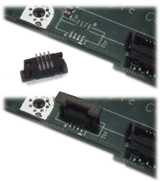 This time a ZIF connector was ripped from logic board by someone bent on saving money. ZIF stands for Zero Insertion Force, by the way, and these connectors require no force to connect or disconnect. Just havta know how they work.
|
| Amateur hard drive replacement A brand-spanking-new $3K notebook underwent a hard drive upgrade at the hands of its new owner, a man who was so focused on trying to pry the machine's cases apart that he neglected to remove a few central screws. Resulting damage was about $500 with a bent V-shaped aluminum top case, a broken keyboard and voided warranty. (Angry that Apple refused to fix it for free under warranty, he brought it in still fuming.)
|
When you don't have the proper tool...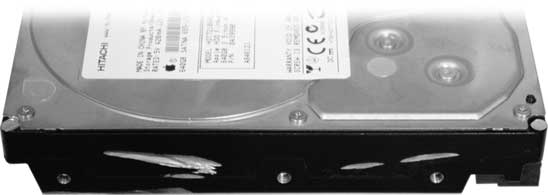 ...use a grinder to remove those screws. Yes, those are angle grinder marks carved into a hard drive containing critical data. And, yes, we recovered it. Took three drives, multiple format and OS upgrades, a battle with missing passwords and malware, but data from 2009 finally made it to 2021.
|
| Disc fishing:
Slot-loading disk drives present a hazard or two that might be unexpected, including the fate of nonstandard CDs and DVDs that enter - and do not exit - these drives. Other foreign matter may find its way into that slot, too, and many a damaged drive has passed thru the shop. 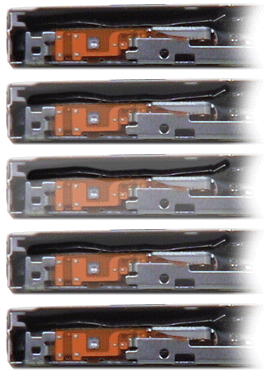 All-time worst advice for curing an optical drive malfunction: A client called to say he'd found a "tip" on the internet for fixing his MacBook Pro's SuperDrive. He'd followed the instructions but it caused the drive to make horrible loud noises even tho there was nothing in it. So, he took his machine apart trying to disconnect the OD and said he'd lost Bluetooth function, video cam and one speaker in the process. What was the "tip?" Cut a CD in half(!), then insert one half into the drive. Whatta stupid thing to do. Needless to say, it gutted the mechanism. We replaced the demolished drive and managed to restore all other functions.
Gotta love that online advice.
|
 |
| Thrashed, trashed and crashed When she called, she said her Mac needed a new trackpad. Said a rock fell on it.
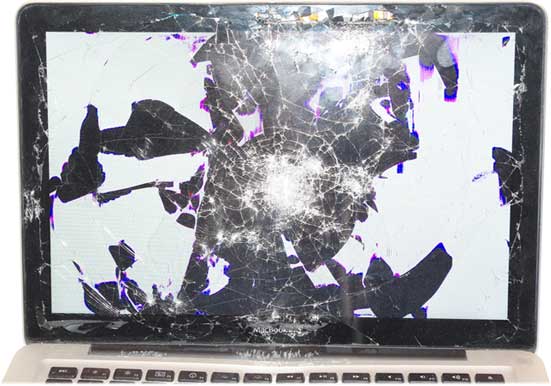 There was nothing salvageable in this wreckage. Nothing. Battery was swollen, keyboard kaput, no video out and only what you see here on startup. Somehow the hard drive survived (once various directory errors were repaired), but that was it.
|